BLOG
Connect Claude Code, Cursor or Copilot to Appknox. Your AI agent finds, fixes and verifies mobile app vulnerabilities with KnoxIQ and a real re-scan.

.png)


BLOG
 4 Mins Read
Appknox MCP agent connects your AI coding agent to your Appknox scan results and KnoxIQ analysis. Your agent triages findings by exploitability, fixes the code in your repo and verifies each fix with a re-scan, inside Claude Code, Cursor, GitHub Copilot, Codex or Windsurf.
Your AI coding agent already writes features, refactors code and fixes bugs. It can't see your security findings.
So when a scan flags a vulnerability in your mobile app, the fix still starts by hand. You copy the finding out of a report, track down the vulnerable code yourself, and wait for another scan to learn whether the fix held.
Appknox MCP closes that gap. It connects your agent directly to your Appknox scan results and KnoxIQ analysis. The agent picks up the most exploitable findings first, fixes them in your code and confirms each fix with a real Appknox re-scan. The whole loop runs inside the editor you already work in, as part of your release cycle. You decide what gets committed.
Scanners find issues in one place. Developers fix them in another: the codebase. Every finding has to be carried across by hand, and that handoff slows remediation in four ways.
Context switching. A finding usually arrives as a PDF report, a Jira ticket or an entry in a security tool's web console. Someone has to turn it into a code change: find the vulnerable class, manifest entry or API call, then check where else the same pattern appears. Every jump between the security tool, the issue tracker and the IDE breaks focus.
No view of exploitability. Most scanners rank findings by severity or CVSS score. Severity tells you how bad an issue could be, not whether an attacker can exploit it in your build. Without that, teams spend sprints on high-severity findings that carry little real risk, while exploitable medium-risk issues wait.
Fixes that break something else. A security fix is still a code change. Changing a base activity, tightening a network security config or removing an exported component can break a screen, a test or a dependency. Developers need to see exactly what a fix touches before it ships.
Slow verification. The only way to confirm a fix worked is to rebuild the APK or IPA, upload it again and wait for a new scan. Many teams skip this step. The finding gets marked fixed without proof, and the vulnerability may come back in the next release.
AI coding agents have made writing and updating code faster. But an agent is only as good as the context it gets. Without the findings, the exploitability data and a way to re-test, it can't close the risk.
We built Appknox MCP agent to bring our security findings to the place where fixes actually happen: your editor. It connects your AI coding agent to Appknox through the Model Context Protocol (MCP), the open standard AI agents use to work with outside tools. 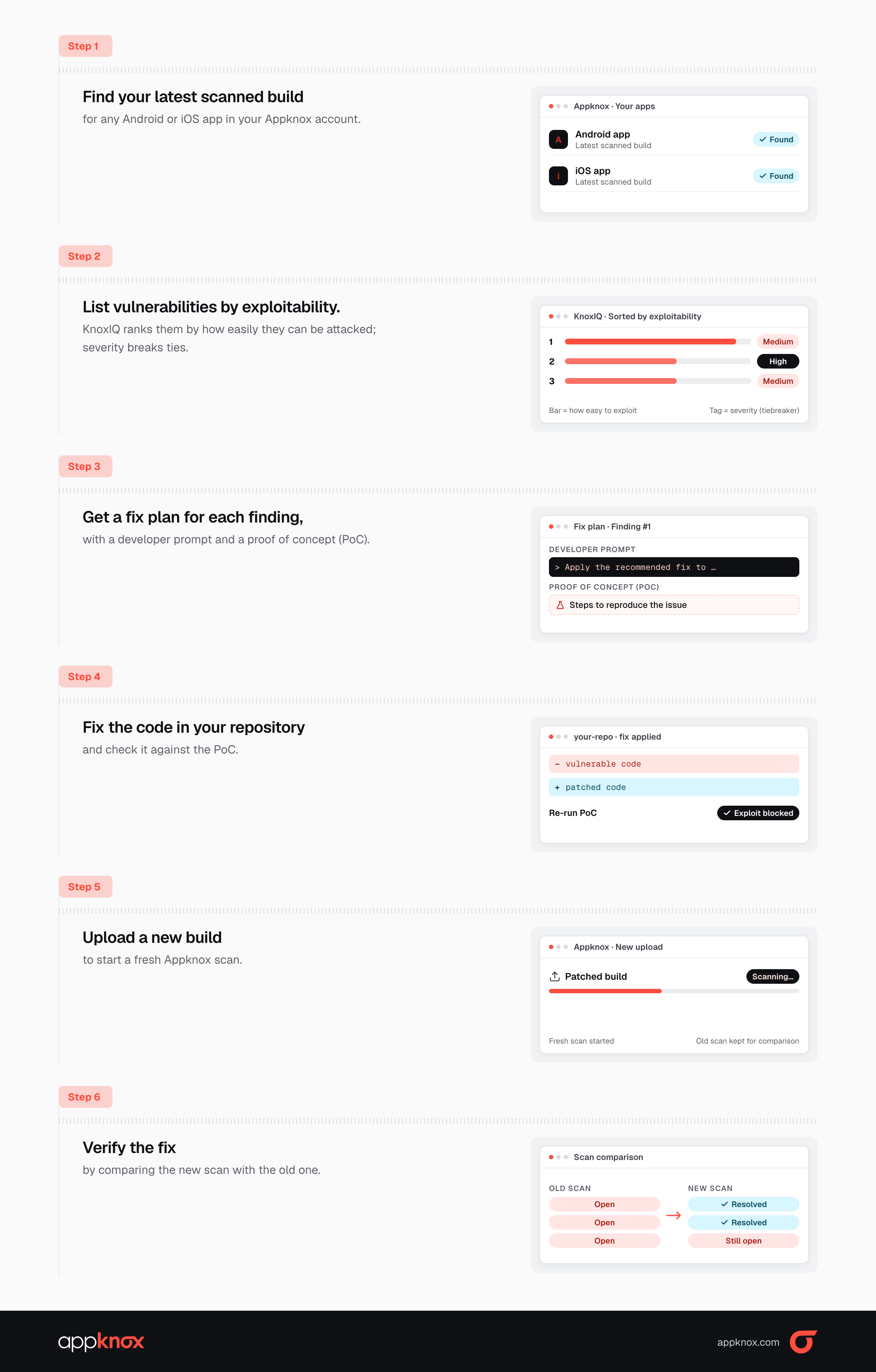
It isn't tied to one tool. knox MCP works with any MCP-capable agent, and we've verified it with Claude Code, Codex, GitHub Copilot, Cursor and Windsurf.
There's also nothing to host. The server runs on your own machine. Your app's code stays in your project folder, and the MCP talks to Appknox only over HTTPS. We receive a binary only when you ask for an upload.
Appknox MCP runs one loop. Your agent does the work in your editor. Appknox decides whether the fix is real.
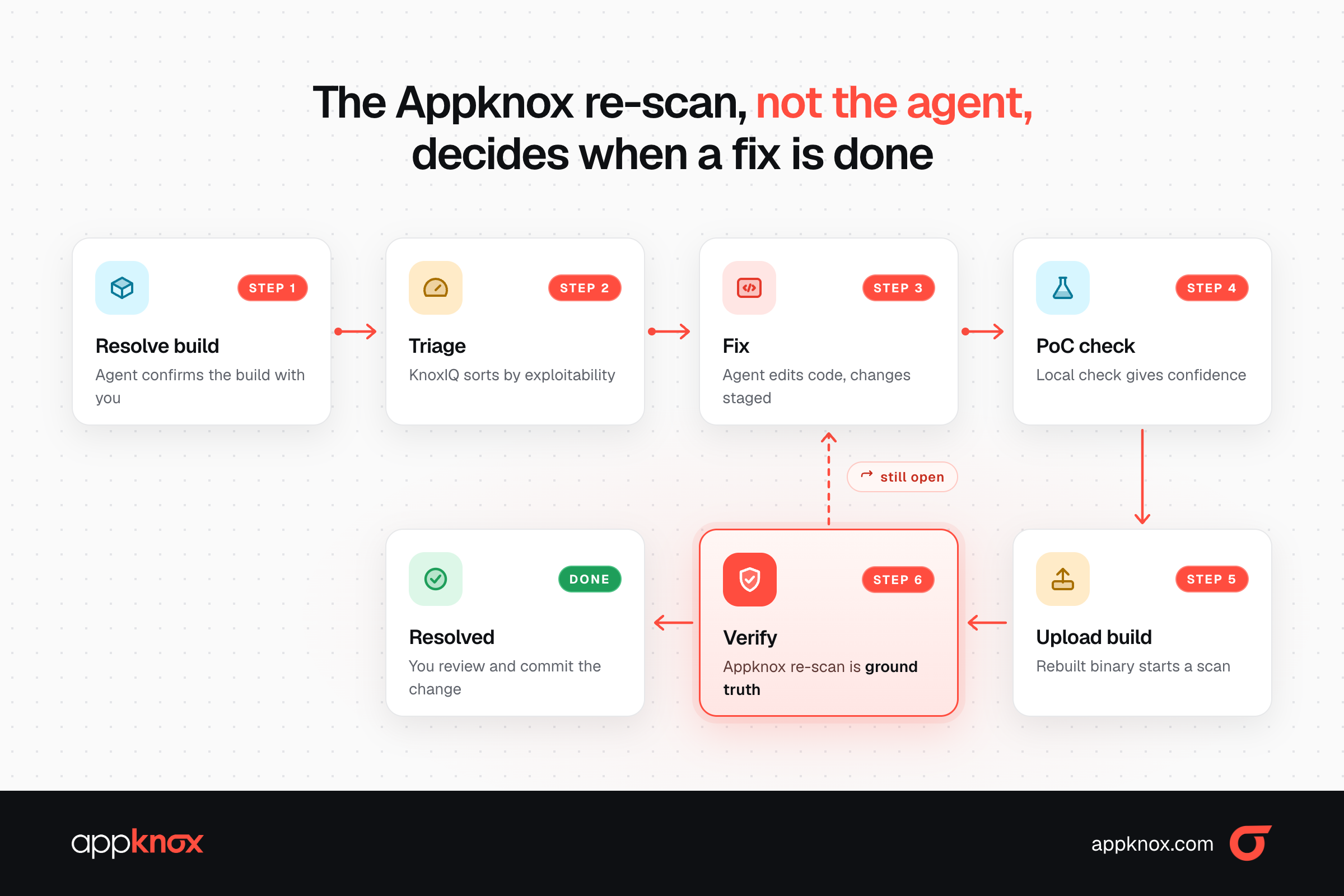
In Claude Code, four shortcuts cover the whole loop:
|
Command |
Use it when |
|
/appknox:triage |
You want to see what's wrong, then pick what to fix |
|
/appknox:fix critical,high |
You already know what to fix |
|
/appknox:upload app.apk |
Your rebuilt app is ready to scan |
|
/appknox:verify |
You want to check whether the fixes worked |
In Cursor, Copilot, Codex or Windsurf, ask in plain English: "Find and fix the Appknox vulnerabilities in this repo." The same workflow is built into the server.
What it looks like in practice. In an internal demo, we ran /appknox:triage on a sample Android app. KnoxIQ flagged a high-severity screen-capture issue (CWE-200): none of the app's five activities set FLAG_SECURE, so other apps could record or screenshot sensitive screens. The agent traced the root cause, added a secure base activity that sets the flag, moved the affected screens onto it, and handed back a PoC to confirm on a device: record the screen, and it should come back black. It didn't build, upload or commit anything on its own. The next step was ours: /appknox:upload, then /appknox:verify.
Putting an AI agent near security fixes raises fair questions. These are the limits we built in:
You need two things: KnoxIQ enabled for your organisation, and a build scanned after KnoxIQ was turned on.
Install the appknox-mcp MCP server for me:
1. uv tool install --reinstall appknox-mcp
2. Run appknox-mcp --install-guide and follow it exactly.
Full setup steps for every client are in the appknox-mcp GitHub repo.
Already on KnoxIQ? Install Appknox MCP and run it on your latest build today.
New to Appknox? Book a demo to see the full loop on your own app.
Hackers never rest. Neither should your security!
Stay ahead of emerging threats, vulnerabilities, and best practices in mobile app security—delivered straight to your inbox.
 Exclusive insights. Zero fluff. Absolute security.
 Join the Appknox Security Insider Newsletter!


