BLOG
62% of DevOps teams say security is their #1 challenge. Here's the CI/CD security toolkit that reduces friction without slowing your pipeline.

.png)


BLOG
 23 Mins Read
You run the pipeline. You own the releases. And somewhere between the security team's findings and the development team's sprint, you're the one getting asked to explain why nothing is getting fixed.
That's not a security problem. It's a coordination problem, and it's structural.
According to the DuploCloud AI + DevOps Report, Sep 2025,
The pipeline is under more pressure than it's ever been. The attack surface is wider than it's ever been. Software supply chain failures now rank #3 in the OWASP Top 10 2025. And the manual processes sitting between those two facts aren't scaling.
This guide is for DevOps Managers who are past the theory stage. It covers the CI/CD security controls that matter most, how to implement them without sacrificing velocity, and when the manual approach is no longer enough.
At the end, there's a downloadable CI/CD Security Controls Toolkit — a control matrix, checklist, and team responsibility map — built for the environment you're actually operating in.
A CI/CD pipeline is a sequence of automated steps that move code from a developer's commit to a production deployment. Continuous Integration handles merging, building, and automated testing. Continuous Delivery handles packaging, release approval, and deployment.
Most pipelines follow the same basic stages:
|
Stage |
What happens |
Where security lives |
|
Code commit |
Developer pushes to the repository |
Pre-commit hooks, secrets scanning |
|
Build |
Code compiled, dependencies installed |
SAST, SCA, IaC scanning |
|
Test |
Automated tests validate functionality |
DAST, API security testing |
|
Artifact storage |
Build artifacts packaged and stored |
Artifact integrity, signing |
|
Staging deploy |
Code moves to pre-production |
Environment isolation, access controls |
|
Production deploy |
Code released to end users |
Deployment gates, RBAC, audit logs |
|
Monitor |
Application monitored in production |
Runtime security, anomaly detection |
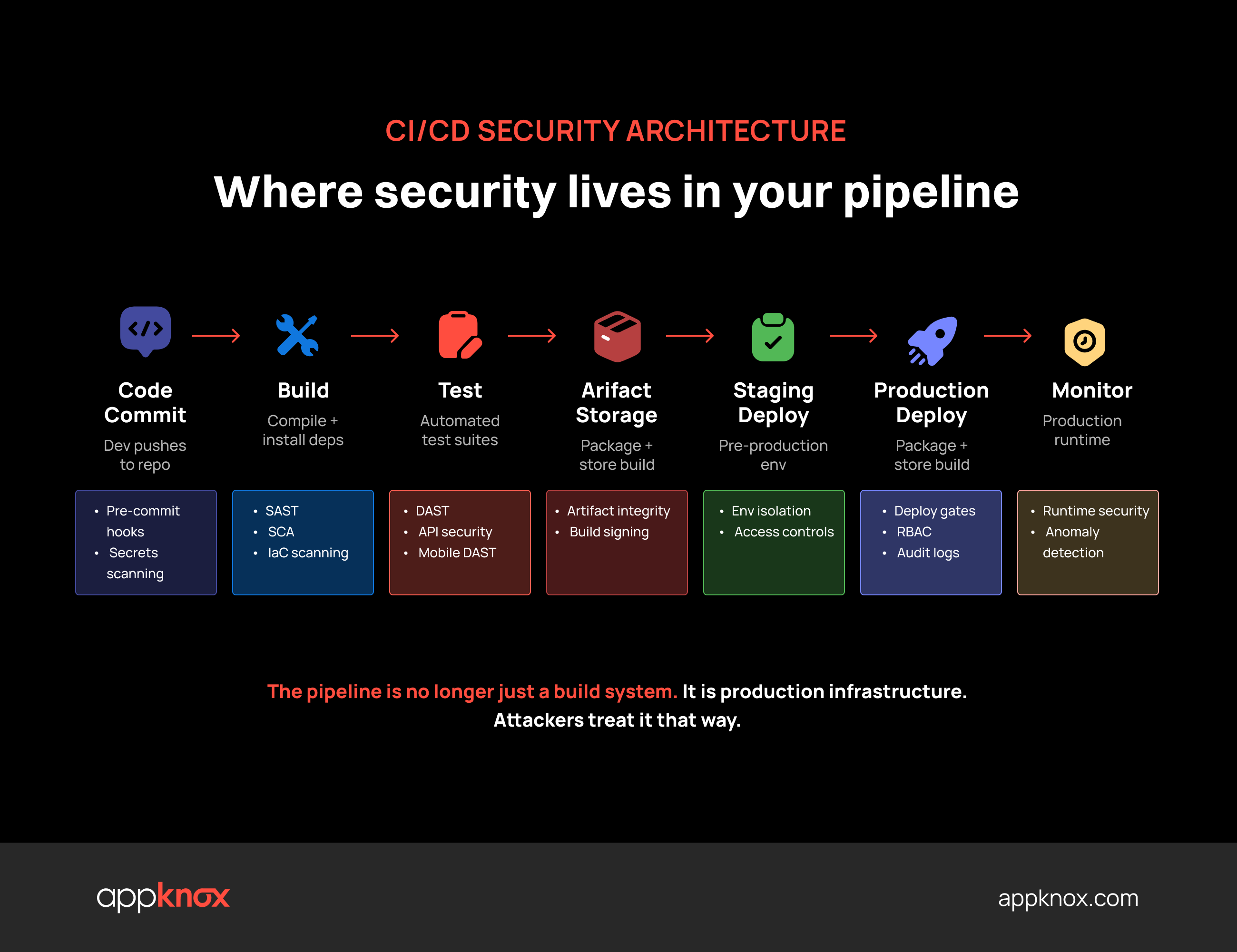
[How an ideal CI/CD security architecture looks]
CI/CD security controls are the policies, configurations, tool integrations, and access rules that protect each pipeline stage from unauthorized access, malicious code injection, credential theft, and supply chain compromise.
They fall into seven categories:
The industry has seen a significant increase in attacks targeting CI/CD ecosystems directly.
The SolarWinds build system compromise spread malware to 18,000 customers. The Codecov breach exfiltrated secrets from thousands of enterprise build pipelines.
In 2025 alone, over 70 security vulnerabilities were found in Jenkins, most related to plugins, with more than 45,000 internet-exposed Jenkins servers remaining vulnerable to a known critical CVE long after a fix was available (JetBrains TeamCity Blog, March 2026).
Software supply chain failures now rank #3 in the OWASP Top 10 2025, moving up from a subcategory in 2021, with 50% of security experts ranking supply chain risk as their top concern.
The pipeline is no longer just a build system. It is production infrastructure. Attackers treat it that way.
Two years ago, that threat was primarily human-speed. Today it is not.
AI-assisted tools have collapsed the window between vulnerability disclosure and active exploitation from weeks to days.
At the same time, the same AI tools that accelerate attackers are being used by development teams to write code: 93% of employees now use generative AI on mobile devices for work, while only 17% of organizations have deployed specific security controls against AI-assisted attacks (Verizon 2025 Mobile Security Index).
AI-generated code enters pipelines without a review process designed for it. It doesn't carry a label. It passes the same linters and code reviews as human-written code. And it introduces a class of logic flaws that static analysis tools trained on human-written code patterns are not calibrated to catch.
That is the new variable. The pipeline attack surface expanded because the code going through it changed, not just the infrastructure around it.
A compromised pipeline doesn't expose a single application. It exposes everything the pipeline touches — source code, credentials, build artifacts, production infrastructure.
84% of organizations suffered a breach caused by a control failure in the past year, two-thirds of which resulted from a combination of two or more control failures, turning common control failures into breaches (Panaseer 2026 Security Leaders Report, survey of 400 security leaders).
Additionally, DevOps tooling outages and security incidents across major platforms — GitHub, GitLab, Jira, Bitbucket, Azure DevOps — logged 607 incidents totaling 9,255 hours of disruption in 2025 — nearly double the 4,755 hours recorded in 2024.
Attackers injected a malicious script into Codecov's CI/CD process, exfiltrating environment variable credentials from thousands of downstream enterprise pipelines.
The root cause of the Codecov 2021 breach was not a sophisticated exploit, but a misconfiguration in Codecov's Docker image build process exposed credentials, enabling attackers to modify the Bash Uploader script. No integrity verification was in place to detect the tampered artifact.
Attackers compromised a senior DevOps engineer's home computer using a remote code execution vulnerability in an unpatched third-party media application.
A keylogger captured the engineer's master password after MFA authentication, bypassing MFA entirely, not because MFA was absent, but because the device itself was compromised.
The engineer was one of only four people with access to the decryption keys for AWS S3 production backups. With those keys, attackers exfiltrated encrypted vault data for the entire customer base.
The root cause of the LastPass breach was that privileged access was permitted from unmanaged personal devices, and the first-stage breach succeeded because cleartext credentials were embedded in source code repositories. This control gap gave attackers the foothold they needed for everything that followed.
Attackers gained access to SolarWinds' internal network in 2019, spent months testing in the build environment, then injected malicious code into Orion platform software updates distributed from March 2020 onward. Approximately 18,000 organizations downloaded the compromised update; of those, nine federal agencies and around 100 private companies were actively exploited (CISA Advisory AA20-352A).
The root cause of the SolarWinds breach was that the build system was implicitly trusted. There were no integrity checks between what was compiled and what was shipped, and no mechanism to detect that the update pipeline itself had been tampered with.
None of these required zero-day exploits. All of them required only that basic controls were absent or misconfigured.
Most pipeline compromises don't require sophistication. They require that an attacker find the control you assumed was someone else's responsibility.
The controls that prevent these incidents are not proprietary.
They are documented, mappable to compliance frameworks, and implementable this sprint. The toolkit below gives you all of them in one place, organized by pipeline stage, pre-assigned by team, with SLA targets already set.
(66 controls, 7 categories, zero setup required)
These are not abstract best practices. Each maps to a known attack vector. Each has been the missing piece in a documented breach.
What it is: Enforcement of least-privilege access across every pipeline component, who can trigger builds, approve deployments, access secrets, and modify pipeline configurations.
How it works:
Why it matters: The LastPass breach, the CircleCI breach, and dozens of smaller incidents all trace back to a single overprivileged account. Identity is the perimeter in modern CI/CD environments. An attacker who doesn't need to break in, because they can log in, will always prefer that path.
OWASP alignment: CICD-SEC-5 (Insufficient Pipeline-Based Access Controls)
What it is: The secure storage, injection, rotation, and auditing of sensitive credentials, API keys, tokens, database passwords, and certificates, at every pipeline stage.
How it works:
Why it matters: 57% of organizations experienced a secrets-related security incident in the last two years (SentinelOne, 2026). A single leaked AWS key from an unmonitored repository can accumulate millions in unauthorized cloud spend before anyone notices.
A practical starting point: Audit your current pipeline for secrets in three places before doing anything else: repository history (Trufflehog can scan the full commit history), CI/CD environment variable configurations, and build logs. Most teams find at least one exposure they didn't know existed.
What it is: Code and dependency scanning is automated security testing integrated at multiple pipeline stages to detect vulnerabilities in proprietary code, open-source dependencies, and running application behavior.
|
Scan type |
What it tests |
When it runs |
Tool examples |
|
SAST |
Proprietary code for known vulnerability patterns |
Build stage |
Checkmarx, Semgrep, CodeQL, Appknox |
|
SCA |
Open-source dependencies for known CVEs |
Build stage |
Snyk, OWASP Dependency-Check, Mend |
|
DAST |
Running application behavior and API responses |
Test/staging stage |
Appknox, OWASP ZAP, Burp Suite |
|
IaC scanning |
Infrastructure definitions for misconfigurations |
Pre-deploy |
Checkov, tfsec, Trivy |
|
Container scanning |
Docker/OCI images for vulnerable packages |
Build/deploy |
Trivy, Grype, Snyk |
|
Secret scanning |
Hardcoded credentials in code and config |
Pre-commit + build |
Trufflehog, GitLeaks, GitHub Advanced Security |
How it works: Each scan type runs at the stage where it catches vulnerabilities most cheaply. SAST and SCA run at the build stage. DAST runs against a deployed instance in staging. IaC and container scanning run pre-deploy. Results feed into a unified dashboard or route directly through ticketing integrations to the team responsible for the finding.
Why it matters: 1 in 2 organizations reports vulnerabilities in their CI/CD pipelines. 56% of developers say security processes significantly slow their work (GitLab Global DevSecOps Report, November 2025).
The false-positive problem: Most SAST and SCA tools generate a high volume of low-fidelity findings. A SAST scanner will flag a vulnerable method in a library your application never calls. An SCA tool will surface 200 CVEs in dependencies, most of which are not reachable in your actual codebase.
The solution isn't more scanning; it's reachability analysis and exploitability validation. Tools that filter noise before findings reach developers create a finding queue that teams trust enough to act on.
What it is: IaC security scans infrastructure definition files for misconfigurations, before anything gets provisioned.
The files it covers: Terraform, CloudFormation, Kubernetes manifests, and Ansible playbooks.
The goal: To catch a misconfigured security group or a publicly accessible storage bucket in the definition, not in production.
How it works:
Why it matters: Security misconfiguration climbed from #5 to #2 in the OWASP Top 10 2025. Cloud adoption has made misconfiguration pervasive and catastrophic.
Misconfigured resources don't announce themselves. They sit exposed until an attacker finds them or an auditor does.
A publicly accessible S3 bucket containing build artifacts or environment configs doesn't require an exploit to compromise. It requires a URL.
What it is: Artifact integrity and supply chain verification verifies that build artifacts — compiled binaries, container images, packages — haven't been tampered with between build and deployment, and that the upstream components they include haven't been compromised.
How it works:
Why it matters: SolarWinds succeeded because the build system was trusted implicitly. There was no integrity check between what was compiled and what was shipped. That single missing control enabled malware to reach 18,000 customers through a legitimate software update channel.
SBOMs are now required under multiple regulatory frameworks and government procurement standards. If you can't answer "what's in every artifact we shipped last month," your supply chain security has a gap.
What it is: Environment isolation and deployment controls are the strict separation between development, staging, and production environments, combined with policy-based gates that control what code can be deployed, under what conditions, and with what approval.
How it works:
Why it matters: 35% of enterprises rely on self-hosted runners with weaker configurations, exposing their pipelines to lateral movement attacks (Wiz State of Code Security Report 2025).
An attacker who compromises a staging environment that shares credentials with production doesn't need to breach production separately. They're already in.
Why should you care about this category: AI-generated code is entering production pipelines without a review process designed for it, and most CI/CD checklists have no controls for it at all.
What it covers:
This category maps to the OWASP LLM Top 10 2025 and the NIST AI Risk Management Framework 1.0.
Most CI/CD security programs cover web application code, infrastructure, and cloud configuration reasonably well.
Mobile applications rarely get the same treatment. This isn't negligence. It's a tooling problem.
SAST, SCA, and IaC scanners were built for web environments. Mobile apps introduce a different attack surface, one that those tools were never designed to model.
Mobile applications don't call APIs the way web applications do. They:
A standard SAST scan runs against the source code. It won't see the token stored in a mobile keychain that an attacker can extract on a rooted device.
A standard DAST scan hits HTTP endpoints. It won't simulate what happens when certificate pinning is stripped and an attacker proxies the mobile app's API traffic.
The attack surface is real. The tooling just isn't looking at it.
A pipeline that takes mobile security seriously needs five things that standard web-focused tooling doesn't provide:
Binary scanning
Analysis of the compiled mobile binary, not just source code, which reflects what users actually receive
Real-device DAST
Testing on real iOS and Android devices, not emulators, because runtime vulnerabilities behave differently under actual device conditions
Mobile-native API security testing
Understanding how mobile apps authenticate, chain API calls, and handle tokens, not just whether REST endpoints return expected responses
Shadow API discovery
Identification of undocumented and deprecated endpoints exposed through mobile app traffic that never appear in standard security inventories
Runtime monitoring
Coverage that doesn't end when the app leaves the build pipeline and reaches user devices
If your current CI/CD security program doesn't explicitly cover your mobile applications and the APIs they call, you have a gap. That gap is the most common entry point for attacks that bypass everything else in the stack.
For a full breakdown of how CI/CD security works for mobile apps and the associated risks, read through our detailed guide.
Check out: DevSecOps Done Right: CI/CD Pipeline Security for Mobile Apps
Key takeaway: Security misconfiguration and supply chain failures are visible in your pipeline. But mobile runtime vulnerabilities are not, unless you're specifically instrumented to find them.
The free DevOps toolkit includes a dedicated Mobile & API Security section
With 15 controls covering binary scanning, real-device DAST, SDK CVE tracking, certificate pinning, debuggable build verification, allowBackup enforcement, and Privacy Shield compliance.
Get the only CI/CD security checklist that maps mobile controls to the OWASP Mobile Top 10 2024 and MASVS.(Includes the mobile security controls your current checklist is missing)
The friction between DevOps and security isn't a personality conflict. It's a system design problem.
Security teams are measured by the vulnerabilities they find. DevOps teams are measured on velocity. Those two metrics are structurally opposed. No amount of "building a DevSecOps culture" resolves a structural misalignment.
Here's where the friction actually lives and what each side sees:
|
Friction point |
Security team sees |
The DevOps team sees |
|
Alert volume |
"We're surfacing all known risks." |
"847 alerts with no priority signal means I ignore all 847." |
|
Release gates |
"We can't approve code with critical vulnerabilities." |
"The 'critical' vulnerability is in a library we don't call." |
|
Remediation ownership |
"Dev needs to fix this." |
"We need a ticket, a fix path, and a sprint slot." |
|
Tool access |
"Use our security platform to check findings." |
"I'm not logging into another portal mid-sprint." |
|
Timeline |
"Security reviews take time." |
"Our release window is Tuesday at 4 pm." |
Every one of these friction points is rational from both sides. That's what makes it structural.
Shifting left isn't about inserting security gates earlier. It's about embedding trust and enablement earlier. The teams that get this right aren't running fewer security checks. They're running better ones, in the right places, with the right signal.
Specifically:
Measure mean time to remediation alongside feature velocity. Security findings become a shared KPI, not a handoff from one team to another.
When both teams are measured on the same outcome, the structural opposition dissolves.
Security alerts that appear in the PR, the IDE, or the CI/CD gate get acted on. Alerts behind a separate portal login don't. The tool must live where the developer lives.
A scanner that surfaces 200 validated, exploitable findings is more actionable than one surfacing 2,000 theoretical ones.
Validate before you route. Developers trust findings they can't dismiss. They dismiss everything they can.
Mobile API findings go to the mobile team. Dependency findings go to whoever manages the dependency tree. Infrastructure findings go to platform engineering.
An unowned finding has no deadline, and a finding with no deadline never gets fixed.
For a comparison of mobile API security tools and how they handle CI/CD integration, check out:
One engineer per team who understands both the security finding and the codebase bridges the language gap that makes most security handoffs fail.
Key takeaway: Security doesn't slow teams down. Unclear security does.
One of the biggest unspoken reasons DevOps and security teams clash is the pressure to release.
In real-world engineering environments, teams sometimes knowingly push releases with vulnerabilities still open. Not because developers don't care about security, but because business deadlines, production incidents, customer commitments, or release windows leave little room for perfect remediation cycles.
What usually happens today:
The problem isn't always the vulnerability itself. The problem is the lack of a shared operational context.
A healthier approach is controlled, time-bound risk acceptance.
.png?width=2600&height=2818&name=Frame%2070%20(1).png)
How mature teams manage risk and ship without missing deadlines
For example:
This creates accountability without blocking delivery, and the key difference is transparency.
Security teams stop treating every delayed remediation as negligence. Engineering teams stop treating security as a deployment blocker.
Over time, this builds a stronger culture:
Because in mature engineering organizations, the goal is not “zero vulnerabilities before every release.”
The goal is understanding:
Before any automation, any platform, or any new tool, you need a clear picture of what controls you have, what you're missing, and who owns what.
Most teams don't have that picture. They have tools installed. That's not the same thing.
The downloadable toolkit gives you four working documents built for the environment you're actually operating in.
Here's a preview of what the checklist covers across all seven categories.
This category does not exist in any other CI/CD security checklist. It was added because 93% of employees already use generative AI on mobile devices for work, and only 17% of organizations have deployed security controls against AI-assisted attacks (Verizon 2025 Mobile Security Index).
Security findings routed to developer workflow tools (Jira / GitHub Issues / Slack): These are typically the findings that land in a security team inbox and never reach the developer who can fix them don't get fixed
The only CI/CD checklist with a dedicated AI/LLM Security category, 15 mobile-specific controls mapped to MASVS and OWASP Mobile Top 10 2024, and a Developer Velocity Dashboard for tracking MTTR and FPR per squad.
Download the CI/CD Security Controls Toolkit →
Free. No login. No form. Open in Excel or Google Sheets and use it today.
The toolkit above is a genuine starting point. Most DevOps Managers will find gaps they didn't know existed within the first hour of working through it. That's exactly the point: visibility before automation.
But manual control tracking has a ceiling. And it's lower than most teams expect.
Here's where it breaks:
The pattern is predictable.
With five apps and one team, the manual toolkit is manageable.
But with fifteen apps, three teams, and weekly releases, it becomes a project that nobody has bandwidth to maintain, which means it stops reflecting reality, which means it stops being useful.
The question isn't whether to automate. It's what to automate first.
Start with the controls that change most frequently: secrets detection, dependency scanning, and deployment gate enforcement. These are the controls that drift fastest and cost the most to remediate when they fail. Automate them in the pipeline, not as a separate process alongside the pipeline.
Then address the gap that most automation misses: mobile application security.
Standard CI/CD security automation covers web code, infrastructure, and cloud configuration well. However, it fails to cover mobile apps' runtime behavior completely. That's where Appknox fits.
Most CI/CD security platforms handle web application code reasonably well. The mobile runtime environment — on-device token behavior, certificate pinning bypass scenarios, runtime API call chains, shadow APIs — is where standard tooling stops and the attack surface continues.
Appknox connects what most security stacks leave disconnected.
DAST runs on real devices, not emulators.
Vulnerabilities that only surface under real-device conditions, such as certificate pinning stripped by an attacker, on-device credential exposure, and runtime authentication failures, are caught before they reach your users. Not after.
No separate scan trigger. No manual upload. No PDF report delivered three days after release. Security testing runs automatically on every build and release, and findings are routed to the team that owns them, with a fix path attached.
Less than 1% false positive rate.
A finding that reaches a developer's workflow through Appknox has been validated for real-world exploitability, not pattern-matched against a CVE database and handed off.
Developers act on findings they can't dismiss. They dismiss everything they can.
Mobile apps call APIs through native flows that standard scanners don't model. Appknox discovers undocumented and deprecated endpoints, those that expose live attack surfaces and don't appear in any security inventory, before an attacker finds them through reverse-engineering an APK.
KnoxIQ, Appknox's AI intelligence layer, validates exploitability, generates proof-of-concept evidence, and delivers developer-ready remediation guidance.
The loop closes: Detect → Validate → Prioritize → Fix — within the same sprint.
Your pipeline generates findings. KnoxIQ tells you which ones can actually be exploited, and exactly how to fix them.
Before you evaluate: the baseline
For teams that need to produce audit-ready compliance evidence alongside pipeline security, check out:
API Testing Compliance: Policies, Performance, and Audit-Ready Proof
Managing CI/CD security with spreadsheets, quarterly audits, and manual handoffs isn't a process problem. It's a scale problem.
Every team starts there. The ones that stay there are the ones that get breached when their pipeline grows faster than their manual controls can keep up with.
The toolkit in this guide gives you a defensible starting point with a 66-control checklist across 7 categories, a coverage matrix, a RACI responsibility map, and a Developer Velocity Dashboard to track MTTR and false-positive rate per squad. All mapped to the frameworks your auditors actually check. Work through it. Find your gaps. Name your owners.
When your mobile app portfolio grows past what that toolkit can track without a dedicated person to maintain it, Appknox closes the loop.
66 controls. 7 categories. 4 sheets. Yours in 30 seconds.
Download the CI/CD Security Controls toolkit now!
See how Appknox automates mobile CI/CD security for enterprise teams
CI/CD security controls are the policies, configurations, tool integrations, and access rules that protect each stage of a software delivery pipeline from unauthorized access, malicious code injection, credential theft, and supply chain compromise.
They span seven categories: access controls, secrets management, code and dependency scanning, IaC security, artifact integrity, environment isolation, and AI and LLM security controls. The last category is added to address AI-generated code vulnerabilities and AI-assisted attacks, mapped to the OWASP LLM Top 10 2025.
The OWASP Top 10 CI/CD Security Risks is a project identifying the most critical security risks in CI/CD ecosystems. The top risks include
It's distinct from the OWASP Web Application Top 10 as it focuses specifically on the pipeline as an attack surface, not the application it produces.
The most effective interventions are structural, not cultural.
To manage secrets in a CI/CD pipeline:
Store secrets in a dedicated vault — HashiCorp Vault, AWS Secrets Manager, or Azure Key Vault.
Inject them at runtime only, never persisting them in build artifacts, environment variables, or logs.
Enforce pre-commit hooks to detect hardcoded secrets before they enter the repository.
Scan repository history periodically.
Most teams find exposures in commits from months or years prior. Automate rotation schedules and test secret revocation before you need it in an incident.
The shift-left approach is most effective when findings are exploitability-validated and integrated into the developer's workflow. It fails when it moves the same high-volume, low-fidelity findings to an earlier pipeline stage without improving signal quality.
Moving those alerts earlier doesn't reduce risk. It moves the noise closer to the developer and accelerates the decision to ignore it.
Supply chain security in CI/CD refers to the set of controls that verify the integrity and provenance of every component in the software delivery chain from open-source dependencies and third-party packages to build tools, CI/CD platform plugins, and deployment infrastructure.
Software supply chain failures ranked #3 in the OWASP Top 10 2025, reflecting a shift in how attackers operate: instead of breaching applications directly, they compromise the tools and components used to build them.
To integrate mobile app security into your CI/CD, connect your mobile security scanner via webhook or native CI/CD integration so it triggers on every build. It takes the compiled binary as input, not the source code, and routes findings to your existing developer tools within the same build cycle.
Four controls belong in that integration: binary SAST on every build, real-device DAST on every release, API security testing scoped to mobile traffic, and shadow API discovery for undocumented endpoints. A single webhook and one configuration change is enough to start.
Standard CI/CD security tooling covers web code and infrastructure. Mobile app security requires additional instrumentation: compiled binary scanning (not just source code), DAST on real devices rather than emulators, API security testing that models how mobile apps authenticate and chain calls, and shadow API discovery for undocumented endpoints exposed through mobile traffic.
These controls run inside the pipeline on every build, not as a quarterly manual pentest alongside it.
To create a CI/CD security checklist:
The downloadable toolkit in this guide provides a 66-control, 7-category checklist built to this structure, with a RACI map and a Developer Velocity Dashboard included.
Hackers never rest. Neither should your security!
Stay ahead of emerging threats, vulnerabilities, and best practices in mobile app security—delivered straight to your inbox.
 Exclusive insights. Zero fluff. Absolute security.
 Join the Appknox Security Insider Newsletter!


