BLOG
Source code analysis tells you if your code is written safely. Binary code analysis tells you if the mobile app you shipped is safe.



BLOG
 6 Mins Read
Most AppSec leads will recognize this meeting. A release is two days out. The source code scanner is green. Then someone asks a question the scanner was never built to answer: Is the build going to the App Store the same thing we scanned?
That question is the real line between source code analysis and binary code analysis. It isn't an old tool versus a new tool, or a developer tool versus a security tool. Source code analysis answers: did we write this safely? Binary code analysis answers: did we ship safely?
Both are fair questions. They are not the same question. In mobile, the distance between them is wider than most teams assume, because the code you write goes through compilers, bundlers, SDKs, and store packaging before it reaches a phone.
This piece is for the person who has to pick an approach, or defend one to a CISO. We'll cover how each works, where source access quietly breaks inside large companies, where binary analysis has real limits, and what to ask a vendor before you sign.
Source code analysis reads what your developers write: Kotlin, Java, Swift, Objective-C, Dart, JavaScript. The scanner parses the code into a model of how data and control move through it, then runs rules over that model. User input reaching a query, a hard-coded key, a weak crypto call. Findings come back with a file and a line number, so a developer can fix them in the same pull request.
To run it, you need the repo, a scanner that supports every language in it, and usually the build setup. It runs early, often on every commit. That is its strength.
Binary code analysis starts from the compiled package: the APK or AAB for Android, the IPA for iOS. The analyzer unpacks it, decompiles or disassembles the code, reads the manifest or Info.plist, and catalogs every library and SDK inside. Then it runs its checks against what is actually there. Findings map to this build, this version, not to a branch.
To run it, you need the build file. No repo access, no language plugins, no build configuration.
So the two approaches read two different objects. The specific things that change between them (third-party SDKs, build flags, obfuscation) are covered in our comparison with code-centric SAST tools. This post is about the decision that sits above that list.
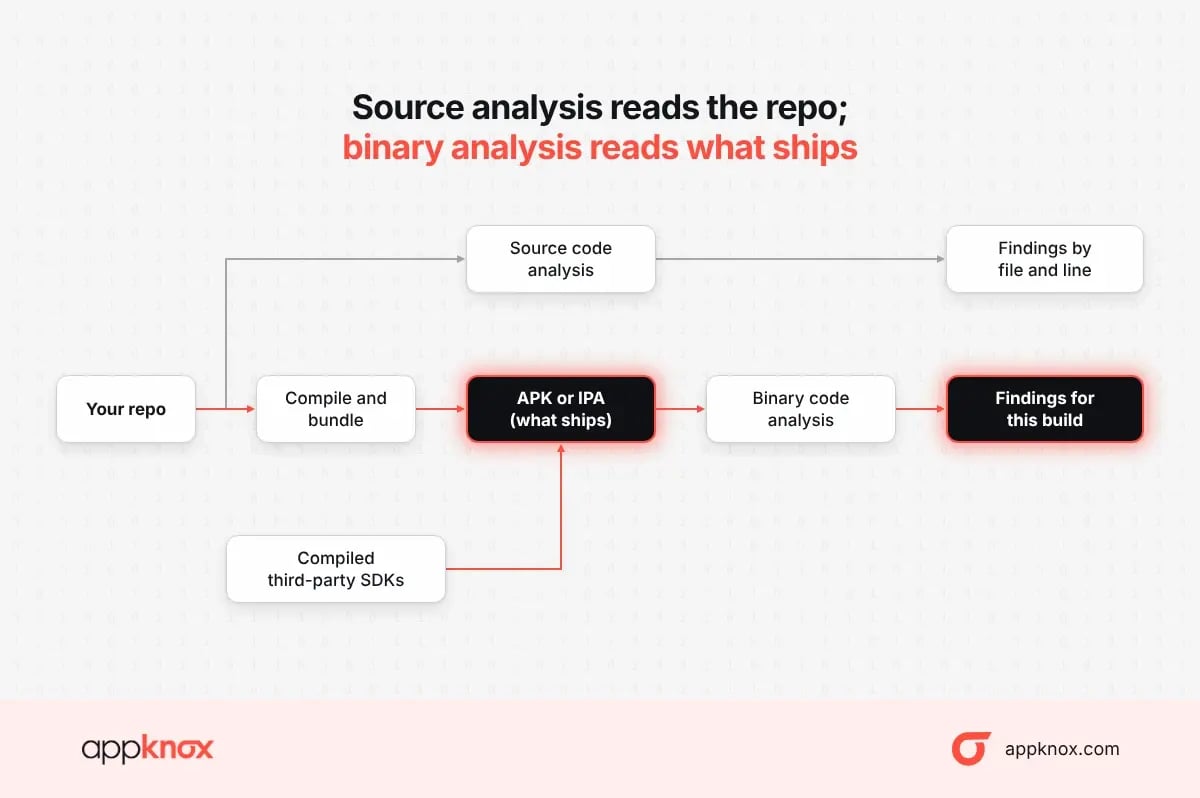
Source vs binary analysis · what each one reads
Source analysis skips the build entirely. Binary analysis reads its output, including the SDKs that never appear in your repo.
Source code analysis works best when one team owns the repo, the languages, and the pipeline. Inside a large company, that is often not the case for the mobile app. The security team's access to source quietly depends on contracts, reorgs, and other people's goodwill.
A few patterns come up again and again:
None of this makes source scanning wrong. It means a program built on source alone has gaps that do not show up on the dashboard. The scanner reports on the code it was given, and nothing tells you what it wasn't given.
Regulators are asking about the shipped product too. Across payments, capital markets, EU product law and medical devices, the ask is converging on one thing: an inventory of every component in the software you release.
|
Rule |
Who it covers |
What it asks for |
In force |
|
Makers of products with digital elements sold in the EU, mobile apps included |
An SBOM in a commonly used, machine-readable format, covering at least top-level dependencies (Sonar). More in our CRA guide for mobile apps |
Most obligations from 11 Dec 2027 |
|
|
Anyone who stores, processes or transmits card data |
An inventory of bespoke and custom software, and the third-party components inside it |
Mandatory since 31 Mar 2025 |
|
|
SEBI CSCRF(India) |
SEBI-regulated entities |
SBOMs for critical systems and for new core or critical software |
Circular issued Aug 2024 |
|
FDA Section 524B(US) |
Makers of internet-connected "cyber devices" |
An SBOM of commercial, open-source and off-the-shelf components |
Submissions from 29 Mar 2023 (FDA FAQ) |
An inventory built from the shipped package describes what is actually in the product. An inventory built from your repo describes your intentions.
This is where the gap stops being theoretical. Two widely used cross-platform frameworks transform your source at build time into something a source scanner never sees.
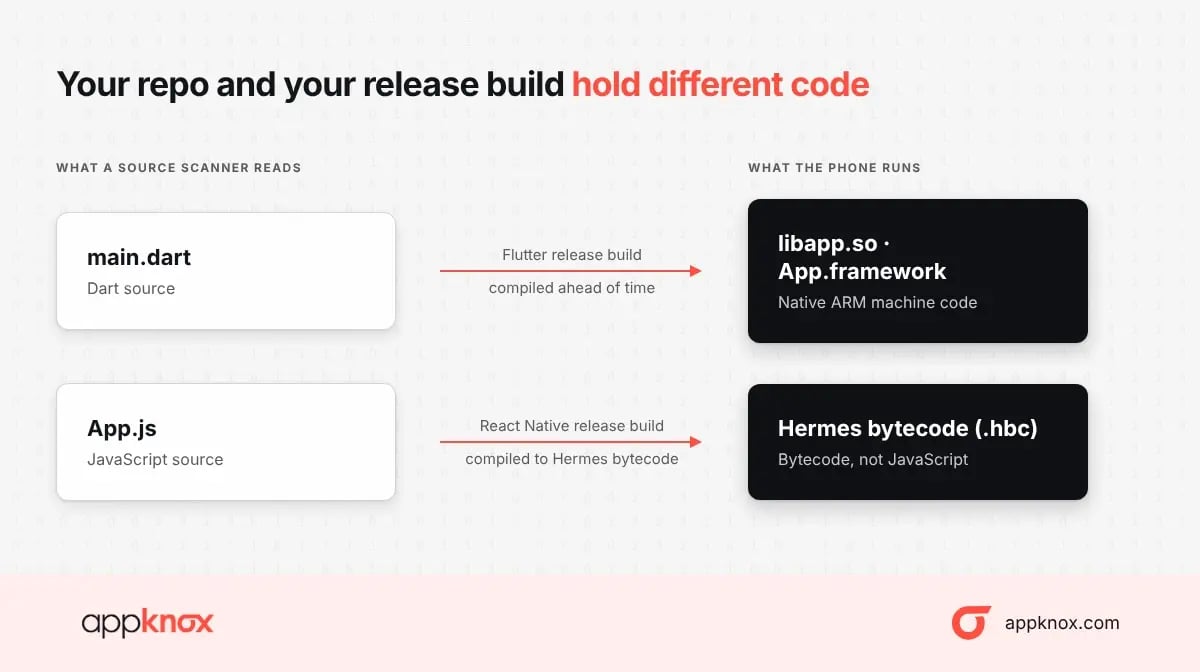
Cross-platform builds · source vs what runs
In both cases, the repo holds Dart or JavaScript, and the phone runs native code or bytecode. A rule that passed on the source tells you the source was clean. It says nothing about what the compiler, the bundler, or a plugin added on the way. If your mobile estate leans cross-platform, binary analysis is no longer a second opinion. It is the only view of the thing that runs.
The practical test for a vendor: ask them to analyze a release Flutter or React Native build, and show you findings that point into the compiled output, not just the manifest.
We build binary-first tooling, so it would be easy to stop here. We won't, because a security lead who buys half the picture loses developers' trust by month two.
Our position: let the binary be the source of truth for release decisions, because it is the thing that ships. Use source scanning where you own the code and want issues caught earlier. And judge any vendor, ours included, on how much of the list is real, reachable, and ready to fix.
The right lead approach depends on who owns the code and who asks you for proof.
|
If this is your situation |
Lead with |
Add |
|
One in-house team owns the repo, mostly native code |
Source scanning on every commit |
Binary analysis as the release gate |
|
Apps built by an agency, or acquired |
Binary analysis on every build you receive |
Source access written into the next contract |
|
Flutter, React Native or mixed stacks |
Binary analysis |
Source scanning for the layers you write |
|
Auditors want evidence per release |
Binary analysis plus an SBOM per version |
Source scanning for developer feedback |
|
Many apps, a small security team |
Binary analysis (one upload, no per-language setup) |
Source scanning where a team asks for it |
|
You distribute partner or white-label apps |
Binary analysis; it is the only option |
Contract terms on SDK disclosure |
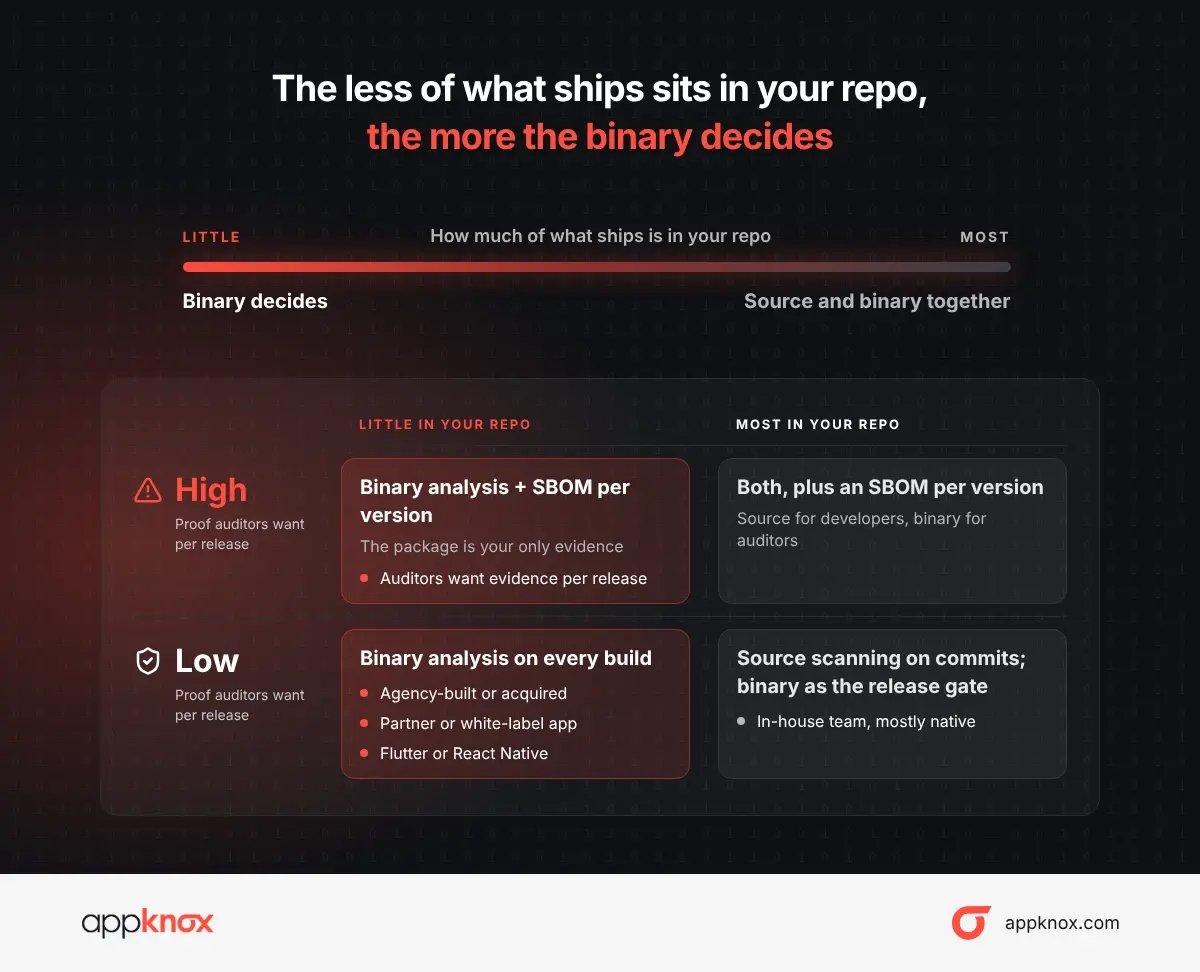
Decision 2x2 · repo coverage vs audit proof
Find your app on the grid: the further left and higher it sits, the more your release decision should rest on the binary.
Eight questions to ask any vendor before you sign
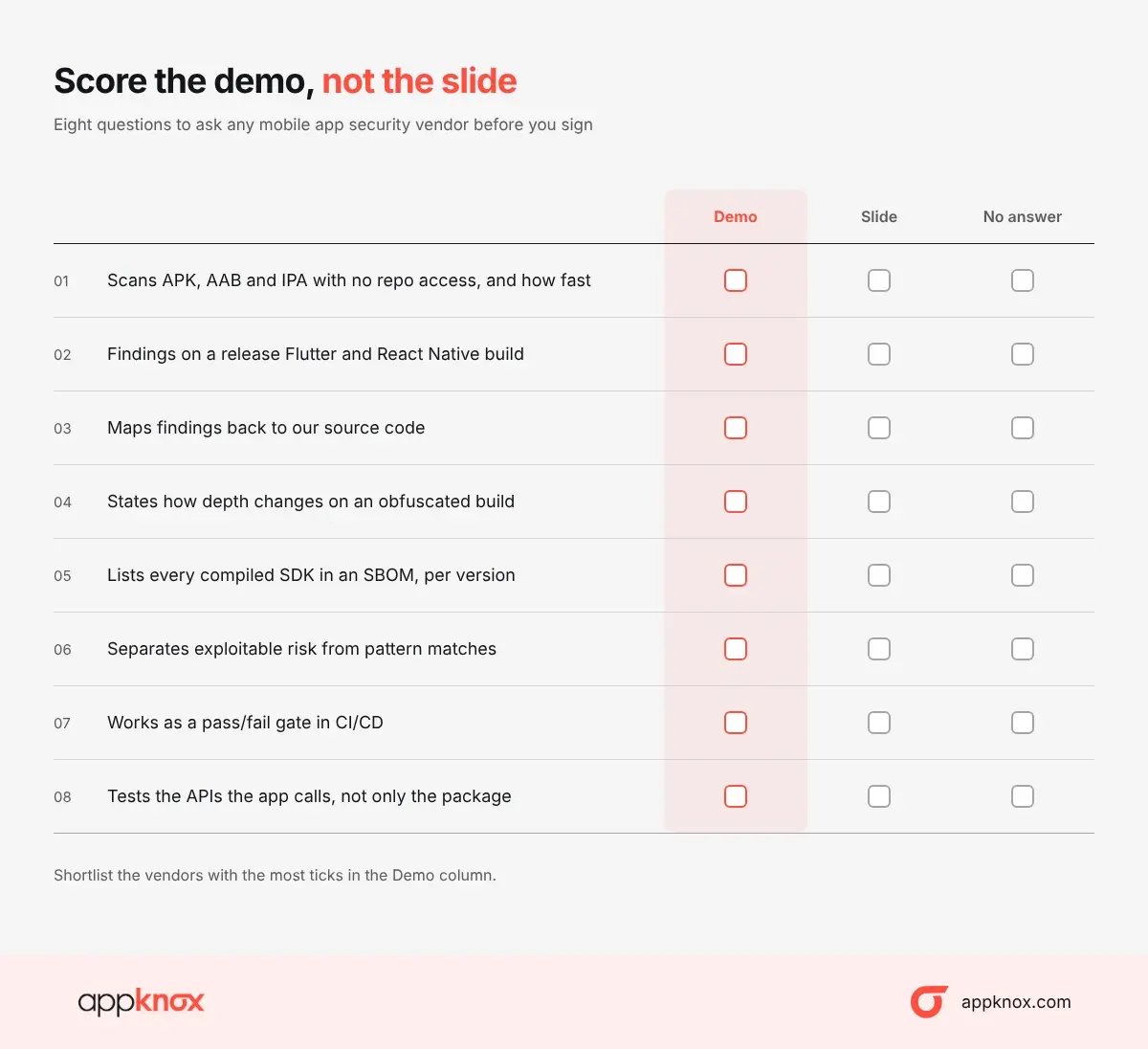
Vendor scorecard · 8 questions, scored by demo.
Appknox assesses the build you ship. Upload an APK, AAB, or IPA, and the platform runs binary SAST, dynamic testing on real devices, and API testing, then builds a binary-based SBOM for that version. Triage separates real, reachable risk from noise. No repo access and no per-language setup.
Already running a source scanner? Keep it. Put the binary at the release gate and see what the package holds that the repo didn't show.
|
See what your release build is hiding. Upload one APK, AAB, or IPA for a free binary static scan and an app store release-readiness verdict. No repo access needed. Want DAST on real devices, API testing, and an SBOM for every version? |
Hackers never rest. Neither should your security!
Stay ahead of emerging threats, vulnerabilities, and best practices in mobile app security—delivered straight to your inbox.
 Exclusive insights. Zero fluff. Absolute security.
 Join the Appknox Security Insider Newsletter!


